



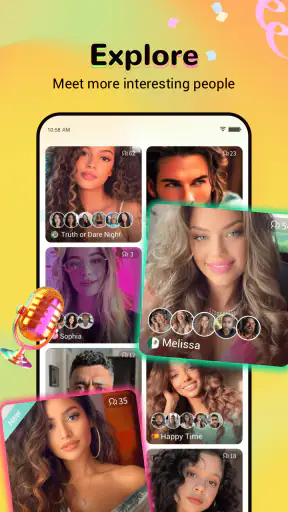




I approached Amigo as a social discovery app rather than as a conventional messaging tool. Its purpose is simple on the surface: help me come across interesting people, then decide whether a conversation is worth my time. That makes the first impression especially important. A social app can have a polished interface, but if discovering people feels slow, confusing, or repetitive, I will stop opening it quickly.
My overall impression is that Amigo works best for users who enjoy meeting people outside their existing circles and who are comfortable with a more open-ended social experience. It is free to download, developed by Insight-Innov, and listed for mature users aged seventeen and over. The app has reached more than five million installs and holds a 4.3 average from roughly 8.4 thousand ratings, which suggests that it has found a substantial audience without making it universally appealing.
How Amigo feels when you are trying to discover people
The central question is not whether Amigo has a long feature list; it is whether it helps me move from browsing to a worthwhile interaction without unnecessary friction. In that respect, I found the concept more interesting than a typical social feed. Instead of opening the app only to check updates from people I already know, I can use it with a clear intention: spend a few minutes exploring, notice who seems compatible, and start a conversation when something feels natural.
That change in purpose affects how I judge speed. I do not need every screen to feel instant if the app gives me a useful sense of direction. What I want is a responsive path between opening Amigo, looking through people, and choosing what to do next. When an app is built around discovery, delays feel more annoying because they interrupt curiosity. A short pause while content loads can make me lose interest faster than it would in an ordinary chat app.
For a quick session, I would use it with a specific limit in mind. I might open it during a break, look for a few promising conversations, and close it rather than endlessly scrolling. That approach makes the experience feel more intentional and also helps avoid one of the common problems with social discovery apps: spending a lot of time browsing without actually connecting with anyone.
Amigo is not the kind of app I would recommend to someone who wants a quiet, private space for a small group of established friends. A traditional messenger is better for that. I see this app as a place for exploration, where the value depends on being willing to interact with people I do not already know.
What affects the feeling of speed
Social discovery apps can feel fast in one moment and heavy in another because they often need to present people, conversations, and media in the same general experience. I would pay attention to how quickly the app settles after opening, how smoothly I can move from one person to another, and whether returning from a conversation puts me back where I expected. These details matter more than a flashy opening screen.
My practical tip is to avoid judging the app from a single rushed launch. Try it when you have a stable connection and enough time to complete one small task, such as browsing a few profiles and responding to one message. That gives a better impression of the complete flow than opening it for ten seconds and closing it immediately. If the experience feels comfortable during that short workflow, it is more likely to fit your routine.
The current version is 4.3.6, and the app supports Android 7.0 or later. That broad compatibility is useful for people who are not using a recent phone, although compatibility alone does not guarantee the same level of comfort on every device. Older hardware may handle a social app differently from a newer model, particularly when several screens or media elements are involved.
What happens during longer or heavier sessions
The demanding moments are likely to appear when I stay active for a while rather than when I simply open the app and leave. Browsing many people, switching between discovery and conversation, and using any media-oriented part of the experience can place more pressure on a phone than reading a short text thread. I would not treat a single smooth launch as proof that extended use will feel equally light.
This is where my own usage habit would make a difference. I prefer to keep one conversation in focus instead of jumping constantly between several screens. That reduces clutter and makes it easier to notice whether the app itself is slowing down or whether the phone is simply handling too many tasks at once. It also makes social interactions feel less disposable, which is important in an app designed around meeting people.
On a newer device, I would expect the experience to be more comfortable during longer sessions. On an older Android phone, I would keep other demanding apps closed before using Amigo for an extended period. That is not a criticism unique to this app; social applications can become less pleasant when a phone has limited available resources. Still, it is a meaningful trade-off for anyone who wants to use Amigo as a frequent, always-open companion.
Battery and data habits are also worth considering. I would avoid leaving a social discovery app active in the background all day unless I genuinely wanted frequent interaction. Open it when you intend to browse or chat, then close it when finished. This simple routine gives me more control over battery use and prevents the app from becoming another source of constant distraction.
A realistic everyday scenario
Imagine finishing work or classes and having fifteen minutes before heading home. With Amigo, I would open the app with one goal: find one person whose interests or conversation style seems appealing, rather than trying to inspect everyone available. I would browse briefly, start a respectful exchange, and then decide whether to continue later. If the conversation feels forced, I would leave it there instead of treating the app like a competition to collect contacts.
That scenario shows where Amigo can be more useful than a standard social timeline. A timeline gives me updates from people I already follow; Amigo gives me a reason to look beyond that familiar group. The trade-off is that the result is less predictable. Some sessions may lead to a good conversation, while others may produce nothing that feels worth pursuing. Users who need consistent, immediate communication may find that uncertainty frustrating.
For heavier use, I would divide the session into short blocks. Browse for a few minutes, reply to messages, and take a break before returning. This is more practical than keeping the app open continuously, especially on a modest phone. It also helps me judge the quality of the social experience instead of confusing a long scrolling session with genuine connection.
Stability, recovery, and the small signs of reliability
Reliability in a social app is not only about whether it crashes. I also care about whether the app recovers gracefully after a weak connection, whether I can understand what happened after returning from another application, and whether the conversation flow remains clear when I move around. A discovery app loses much of its appeal if I have to repeatedly reconstruct where I was.
I would recommend testing Amigo in the situations in which you actually plan to use it. If you expect to chat while commuting, try a short session in a place where your connection is less consistent. If you use it mostly at home, test it during a normal evening rather than relying only on a quick launch. The point is not to demand perfect conditions; it is to see whether the app fits your real routine.
When a social app behaves unpredictably, the safest habit is to avoid repeating an action immediately. If a message or screen appears delayed, wait before tapping several times. Repeated actions can create confusion in any interactive service, especially when a connection is changing. I would also close and reopen the app if navigation becomes unclear, then check whether the conversation or discovery position has returned to a sensible state.
That recovery experience matters more to me than occasional minor hesitation. A brief pause is tolerable if the app returns to a usable state. A confusing reset is more damaging because it makes me hesitate before starting another conversation. For Amigo, trust is built through these small moments: I need to feel that my attention will not be wasted when I move between discovery and communication.
Where reliability meets social comfort
There is also a human side to reliability. If I am beginning a conversation with someone new, an interruption can make the exchange feel awkward. I would therefore avoid starting an important or personal conversation when I am in a hurry or using an unstable connection. Amigo is better suited to moments when I can give a new interaction a little attention rather than treating it like a background task.
This is one reason I would not compare it directly with every messaging app. A messenger is usually judged by dependable delivery between known contacts. Amigo is judged by both technical consistency and the quality of discovery. Even if the app performs well, it cannot guarantee that every person I encounter will be interesting, responsive, or compatible with my expectations.
That uncertainty is not a flaw to hide; it is part of the product choice. I would choose Amigo when I want possibility and variety. I would choose a familiar messenger when I want certainty, a stable contact list, and conversations that already have context.
Device limits, age suitability, and spending choices
Amigo supports Android devices running version 7.0 or newer, so it is not restricted to only the latest phones. That makes it accessible to a wider range of users, but anyone with older hardware should still set realistic expectations. A phone that is comfortable with basic messaging may feel less relaxed during a social discovery session involving frequent browsing or media.
I would begin by keeping the first session short on an older device. Check whether navigation remains comfortable, whether switching away and back feels natural, and whether the phone becomes noticeably warm or sluggish during ordinary use. If those signs appear early, Amigo may still be usable for brief conversations, but it may not be the right app to leave open for long periods.
The app is free, which lowers the barrier to trying it. However, in-app purchases range from twenty cents to $249.99 per item. That is a very wide span, so I would approach optional spending carefully and never assume that paying is necessary to make the basic experience worthwhile. Set a personal limit before exploring any paid elements, particularly if the app becomes part of a daily habit.
The mature seventeen-plus rating is equally important. I would not install it for a younger teenager simply because the download is free or because the interface appears approachable. Parents and guardians should treat the age guidance seriously, and adults should remember that meeting unfamiliar people online requires ordinary caution: avoid sharing sensitive personal details too early, keep boundaries clear, and stop engaging when a conversation becomes uncomfortable.
These considerations also help identify who should skip Amigo. If you dislike interacting with strangers, want a tightly controlled social circle, or prefer apps with a predictable feed of known contacts, another option will probably suit you better. If you are under the stated age, it is not an appropriate choice. If you are highly sensitive to optional purchases, use the free experience first and decide whether the app earns a place in your routine before spending anything.
How it compares with familiar alternatives
Compared with a standard messenger, Amigo offers discovery instead of simply maintaining existing relationships. That can make it feel more adventurous, but also less dependable. Compared with a conventional social network, its appeal is more focused: I am not necessarily opening it to follow a broad public feed or keep up with people I already know. I am opening it to see who I might meet.
That distinction gives Amigo a clear use case. Someone moving to a new area, looking for broader social contact, or simply tired of seeing the same familiar updates may appreciate the change. On the other hand, users who want detailed group organization, work communication, or a carefully curated audience should probably look elsewhere. Amigo is not a replacement for every social tool; it is a different starting point for interaction.
My most useful comparison is therefore about intention. Choose a messenger when you already know who you want to contact. Choose a traditional social network when following communities and ongoing updates matters most. Choose Amigo when the interesting part is discovering a person before you know whether they will become part of your social circle.
My verdict after weighing the trade-offs
I see Amigo as a worthwhile experiment for adults who want social discovery to feel more active than scrolling through familiar posts. Its free entry, broad Android compatibility, and established audience make it easy to try, while the mature age rating and optional purchases mean it should be approached with sensible boundaries.
The strongest reason to use it is not a promise of endless entertainment. It is the chance to turn a spare moment into a new conversation. The best results will come from users who browse selectively, communicate respectfully, and accept that not every session will produce a meaningful connection. That mindset also reduces the pressure to keep scrolling or spend money.
My performance judgement is cautiously positive: I would expect the most comfortable experience on a reasonably modern phone and during focused sessions, while older devices and prolonged, media-heavy use deserve more attention. I would not install it solely because I need a flawless replacement for messaging. I would install it because I want a different way to meet people and am willing to accept some unpredictability.
In the end, Amigo is best when discovery is the point, not merely a route to another familiar feed. I would recommend giving it a measured trial, using the free experience first, keeping personal information private, and judging it by whether the conversations it helps me find are genuinely worth returning for.


